YASNAC - SafetyNet Checker
- 4.6
- Rating
- 500.00K
- Installs
- Free
- Price

 Analysis by App-foxy
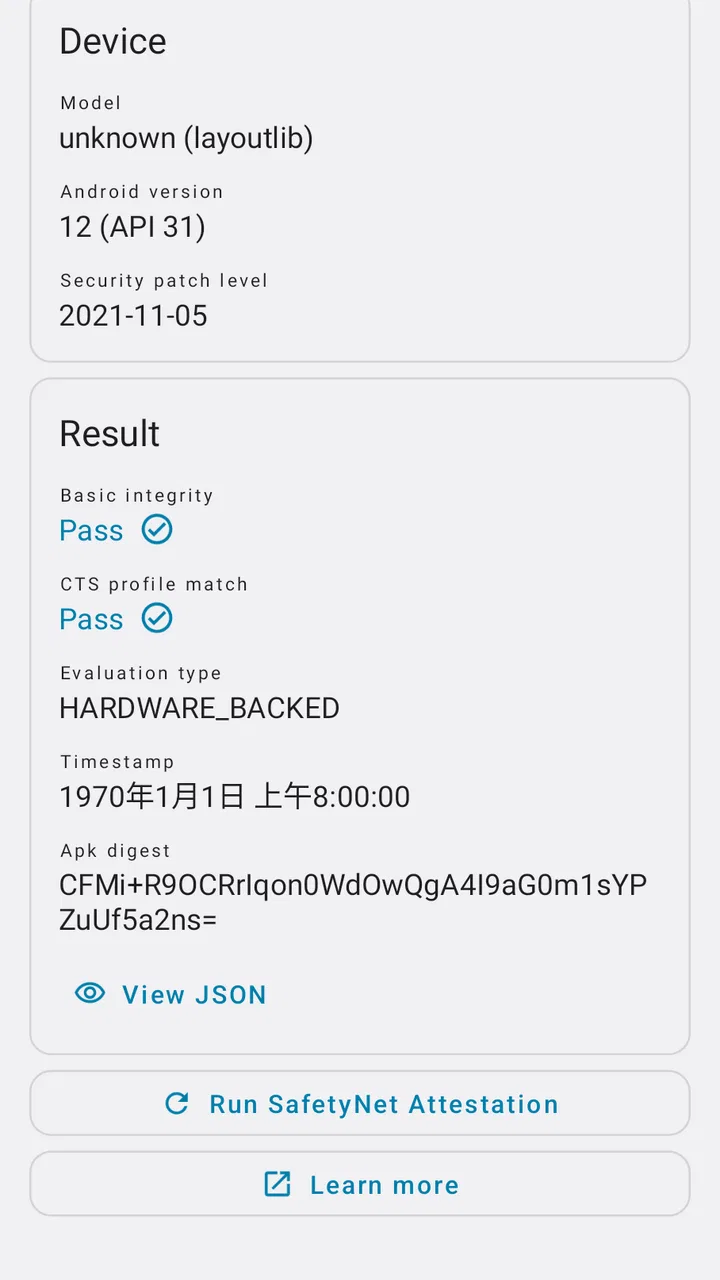
When an Android device behaves strangely, the hardest part is often finding out whether the problem comes from an app, the operating system, a modified setup, or a failed integrity check. I found YASNAC - SafetyNet Checker useful because it turns one narrow technical question into a quick, readable check. It is a free utility from Xingchen & Rikka, listed in the Libraries & Demo category, and its entire purpose is to examine SafetyNet attestation rather than trying to become a general device diagnostic suite.
That focus is both its biggest strength and its main limitation. If I need to understand why a banking app, game, streaming service, or other security-sensitive application rejects my phone, this is a sensible first tool. If I want battery analysis, storage cleaning, network testing, or a complete hardware report, I would choose something else. The app does not replace troubleshooting; it gives me a useful piece of evidence before I start changing system settings.
What the check means when the phone is connected
The most important part of using YASNAC is understanding that an attestation result is not simply a permanent label attached to the handset. The check involves the device environment and the service responsible for evaluating it, so connectivity can shape the moment when the result appears. I treat the screen as a current diagnostic snapshot, not as a guarantee that every protected app will behave identically afterward.
You May Also Like

 Blood Strike: 2.5 Anniversary
Blood Strike’s Loadouts Turn Every Drop Into a Tactical Gamble
A close look at Blood Strike’s custom loadouts: how fast access to signature weapons reshapes its battle royale rhythm, rewards preparation, and narrows the gap between fights.

 Pandora - Music & Podcasts
Pandora’s Music Is Easy to Start, but Harder to Recover
Pandora’s strength is its low-effort path from a seed to a station. Its weak spot is how much confidence it asks you to place in connection, setup, and quiet recovery.

 8 Ball Pool
 Is Built on Rivalries, Rematches, and Routine
A close look at the rivalries, rematches, shared routines, and unanswered safety questions that turn a quick pool match into a persistent mobile community.

 Samsung Music
’s Quiet Strength Is Playing What You Already Own
Its reach comes less from spectacle than from dependable access to a personal library. That simplicity is both the app’s strongest retention engine and its ceiling.

 AccuWeather: Weather Radar
AccuWeather Review: A Quick, Clear Forecast for Everyday Decisions
For everyday plans, the best forecast is the one you can understand quickly. AccuWeather makes rain timing, radar, and local conditions easy to act on, with a few trade-offs.

 Hill Climb Racing
Why Hill Climb Racing Still Turns Crashes Into One More Run
A tiny car, a bumpy hill and one more upgrade: Hill Climb Racing keeps resurfacing because its simple chaos makes every near-miss feel personal.
More From Our News Desk



This matters when a result takes longer than expected or does not appear as cleanly as I hoped. A weak mobile signal, a congested public Wi-Fi network, or a connection that silently blocks part of the request can make a small utility feel unreliable even when the phone itself is fine. My practical approach is to repeat the check after moving to a stable connection, then compare the result with the behavior of the app that originally caused concern.
That workflow prevents a common mistake: changing several system settings after one inconclusive attempt. I would first run the check, note what it reports, and avoid rebooting or modifying anything until I have tried again under better network conditions. If the result changes only after the connection changes, the network context deserves attention before I blame the operating system.
YASNAC is especially helpful because it keeps the investigation narrow. Instead of presenting a large dashboard full of unrelated sensor readings, it directs my attention toward attestation. That makes it easier to explain the situation to someone else: I can say that I checked the device integrity path and then separately investigate the app, account, connection, or system configuration.
Why a result is not the same as an app guarantee
A successful check does not automatically mean that every protected service will accept the phone. Applications can apply their own rules, use different checks, react to account conditions, or fail for reasons unrelated to attestation. I would never use one YASNAC result as proof that a banking app must work. It is evidence, not a universal certificate.
The reverse is also true. A failed result does not tell me that the phone is permanently unusable. It tells me that something in the current environment deserves investigation. The cause could involve system modifications, the device state, the service response, or the connection used for the request. The app is valuable precisely because it helps separate a vague complaint from a more specific technical lead.
This is where the tool compares favorably with ordinary device-information apps. Those alternatives can show model names, Android details, memory, or sensors, but they usually do not answer the particular question I have when a security-sensitive app refuses to run. YASNAC is less broad, yet more relevant when the problem is attestation.
Using it in ordinary mobile situations
I can imagine opening the app in several realistic situations. Suppose I am traveling and install an important service on a secondary phone. The installation completes, but the service refuses to sign in or displays a security warning. Rather than immediately clearing data, reinstalling everything, or assuming the phone is defective, I can use YASNAC to check whether the device environment is producing an attestation problem.
Another useful scenario is after a major change to the phone. People who experiment with system software, unlock-related configurations, or other advanced Android setups often need a quick way to see whether a change affected integrity checks. Here, a small dedicated checker is more convenient than searching through several unrelated diagnostic screens. I would run the check before the change and again afterward, keeping the comparison as simple as possible.
It can also help when supporting a less technical family member. If someone says that one app suddenly stopped working, I can ask them to open a focused checker instead of requesting screenshots from multiple settings pages. The result does not solve the issue by itself, but it gives the next conversation a clearer starting point. That is a surprisingly practical strength for a tool aimed at a technical subject.
On a phone with limited screen space, the concise design is welcome. I do not need a large interface or a long setup process just to inspect one category of behavior. At the same time, a small screen makes it important to read the labels carefully rather than jumping to the most reassuring-looking line. The useful habit is to interpret the complete result and then test the affected application separately.
When mobile data is the better test
Wi-Fi is not always the neutral choice people assume it is. A workplace, hotel, school, or café network may use filtering, sign-in pages, or traffic controls that interfere with a request. If YASNAC behaves oddly on such a network, I would switch briefly to mobile data and repeat the check, provided my plan allows it. That comparison can reveal whether the issue follows the phone or the connection.
The reverse test is useful too. If mobile data produces a confusing result, I would try a trusted Wi-Fi network rather than repeatedly tapping the check button. The point is not to consume data or perform endless retries; it is to create one clean comparison. This is one of the most useful habits I picked up with the app: change one condition at a time.
Connectivity also affects where the app fits into a troubleshooting routine. I would not wait until I am in a basement, on a train, or behind a captive portal to investigate a security warning. If I know I will need the result while away from home, I would run the check earlier and understand that a later result may need to be refreshed. The app is quick to consult, but the surrounding network still matters.
What to do when the check fails or feels unclear
A failed or incomplete-looking check can be frustrating because the app is intentionally specialized. It does not walk me through every possible repair, and that restraint is reasonable, but it means I need a disciplined recovery process. First, I would confirm that the phone has a working connection. Next, I would retry once, preferably on a different trusted network. Then I would restart the phone only if the wider device behavior suggests a temporary system problem.
I would avoid treating repeated retries as a solution. If the same result returns, the next step is to compare it with the original symptom. Does the protected app fail at launch, during sign-in, or only when a particular feature is used? Does another security-sensitive app behave normally? These details help determine whether YASNAC has identified the likely cause or whether the problem is elsewhere.
For advanced users, the result can serve as a checkpoint while undoing recent changes. I would reverse the most recent modification first, run the check again, and then test the affected app. Making several changes at once destroys the comparison and can create new problems. YASNAC is most useful when I use it as part of a controlled sequence rather than as a magic repair button.
There is also a human limitation: attestation terminology can be intimidating. Someone unfamiliar with Android security may see a failed status and assume the device is dangerous. I think the responsible interpretation is narrower. The status indicates how the current environment was evaluated by the attestation process; it does not, on its own, diagnose malware, prove that personal data is exposed, or explain every application failure.
Recovery without overcorrecting
My advice is to capture the result mentally or in a private note, then investigate the least disruptive explanation first. Check the connection, confirm that the date and basic system behavior are sensible, and compare the result after a clean retry. Only then would I consider more involved system-level troubleshooting. This order protects against the common overreaction of resetting a phone because one check was inconclusive.
YASNAC is not aimed at users who want a guided repair wizard. A beginner may prefer a manufacturer support channel or an app-specific help page once the basic check is complete. An experienced Android user, however, may appreciate that the tool does not bury the central result under unrelated recommendations. I see it as a measuring instrument, not a mechanic.
What the app means for data-conscious users
Because the check is tied to a remote attestation process, I would use it with the same practical caution I apply to any connected diagnostic utility. I would avoid running it repeatedly just out of curiosity, especially when I am on a limited mobile plan or a congested connection. One deliberate check followed by a comparison is usually more informative than a long sequence of identical attempts.
The app’s narrow purpose is helpful here. I am not opening it to browse a feed, upload files, or manage a large collection of device information. I use it when I have a specific question. That makes it easier to keep the workflow focused: connect through a trusted network, perform the check, interpret the result, and close the app while I investigate the actual service that is failing.
I would still avoid using an untrusted public connection for sensitive troubleshooting if I have a safer alternative. That is not a special accusation against YASNAC; it is simply good mobile practice. A stable home network or personal mobile connection gives me a cleaner test and reduces the chance that a captive portal or filtering layer will confuse the result.
Another data-conscious habit is separating diagnostic evidence from personal information. If I need help from a forum or a friend, I would share only the relevant status and device context, not screenshots containing unrelated account details. The app makes a technical result easy to obtain, but I remain responsible for deciding what to disclose.
Who will get the most value
I think YASNAC is a strong fit for Android users who test system configurations, maintain more than one phone, troubleshoot protected applications, or simply want a direct answer before contacting support. It is also useful for technically curious people who prefer checking a condition themselves instead of guessing from vague error messages.
I would skip it if my goal is routine phone maintenance. It is not the right choice for cleaning storage, measuring Wi-Fi speed, checking battery health, identifying hardware components, or managing permissions. A broad device-information app is better for those jobs. Likewise, if the only problem is a forgotten password or a server outage, an attestation checker is unlikely to add much.
The age rating is Everyone, and the app is free, which removes two common barriers for casual troubleshooting. Still, the subject matter is more technical than the rating might suggest. A new Android user may understand the result only with additional explanation, while an experienced user can move quickly from the result to a targeted investigation.
Current release and long-term usefulness
The app was released on October 10, 2021, and the current version is v1.1.5.r65.15110ef310. I mention that because tools connected to Android security need to be considered in the context of the phone and its software environment. A checker can remain useful while the platform around it changes, but I would not assume that an old result explains every new behavior after an operating-system update.
Its public adoption is a reassuring sign for a specialized utility: it has over 500 thousand installs, an average rating of 4.6 from around 2.1 thousand ratings, and 63 written reviews. Those figures do not prove that it will solve my particular problem, but they fit my impression of a focused tool that has found a real audience among Android users who need this kind of check.
The developer, Xingchen & Rikka, has kept the concept clear rather than turning it into a crowded toolbox. That clarity makes the app easy to place in a troubleshooting kit. I would not open it every day, but I would keep it available for the moment when an otherwise ordinary phone is rejected by a service and I need evidence before making risky changes.
My connectivity verdict
My final view is that YASNAC works best when I treat connectivity as part of the diagnostic situation, not as invisible background infrastructure. A result obtained through an unstable or restricted network deserves a careful retry. A consistent result across a trusted connection is more useful, but it still needs to be compared with the behavior of the affected application.
The app’s strongest quality is its precision. It answers a specialized Android question without distracting me with a large collection of unrelated tools. Its main weakness is that it stops at diagnosis, and the terminology can leave less experienced users unsure about what to do next. That is a fair trade-off for a lightweight checker, as long as I understand its boundaries.
I recommend it to anyone who has encountered a security or integrity warning and wants a fast, focused starting point. I would not recommend installing it as a general-purpose phone monitor, because that is not what it is designed to be. Used deliberately, on a trustworthy connection and alongside app-specific troubleshooting, YASNAC - SafetyNet Checker gives me a practical way to replace guesswork with a clearer technical signal.
FAQs for YASNAC - SafetyNet Checker
01What is YASNAC - SafetyNet Checker used for?
YASNAC - SafetyNet Checker is an application that verifies the integrity and compatibility of your Android device with Google's SafetyNet API. This tool is particularly useful for developers and advanced users who want to ensure their device can run certain applications or services that require SafetyNet validation.
02Is YASNAC - SafetyNet Checker safe to use?
Yes, YASNAC - SafetyNet Checker is safe to use. It is a read-only application, meaning it does not make any changes to your device or its settings. It simply checks your device's compatibility with SafetyNet and provides the results, ensuring no harm or alterations are made.
03Does YASNAC - SafetyNet Checker require root access?
No, YASNAC - SafetyNet Checker does not require root access to function. The application performs its checks without needing elevated permissions, making it accessible to users with both rooted and non-rooted devices while maintaining security and privacy.
04Can YASNAC - SafetyNet Checker fix SafetyNet issues?
No, YASNAC - SafetyNet Checker cannot fix SafetyNet issues. It is a diagnostic tool designed to check and report your device's SafetyNet status. If your device fails the SafetyNet check, you may need to investigate further or seek technical assistance for resolution.
05Is YASNAC - SafetyNet Checker available for iOS devices?
No, YASNAC - SafetyNet Checker is not available for iOS devices. It is specifically designed for Android devices to check compatibility with Google's SafetyNet API. iOS does not use the SafetyNet system, so the application is not applicable to Apple devices.
Pros
- Simple interface for easy use.
- Fast SafetyNet status checks.
- No ads or in-app purchases.
- Requires minimal device permissions.
- Open-source
- ensuring transparency.
Cons
- Limited to SafetyNet checks only.
- No detailed explanations for errors.
- May not support older Android versions.
- Requires internet connection to work.
- Lacks user support or FAQ section.

YASNAC - SafetyNet Checker
Gallery